Claude Code + MIMO: Solving Multimedia Recognition with PreToolUse Hook
Acknowledgments: This tutorial builds on the mimo-media-recognition-mcp project developed by congxxx. Original article
Original repository: https://github.com/congxxx/mimo-media-recognition-mcp
This article extends the original solution with a PreToolUse Hook mechanism to prevent the Agent from directly reading multimedia files during long-task reasoning, which would otherwise cause errors.
1. Background
1.1 The Core Problem
Following up on the Claude Code setup tutorial, after connecting DeepSeek to Claude Code, a new problem emerged: DeepSeek V4pro is not a multimodal model, meaning it cannot natively process multimedia content — such as images, audio, or video.
1.2 The Original Solution
Through web search, I found an elegant architecture proposed by congxxx:
Claude Code (mimo-v2.5-pro)       ← Main conversation, strong reasoning
    ↓ Needs image/audio/video recognition
    ↓ Calls MCP
MIMO Media Recognition MCP        ← Dedicated multimedia recognition
    ↓ Calls MIMO API (mimo-v2-omni)
    ↓ Returns recognition result (text)
Claude Code continues              ← Context preserved
Via the MCP protocol, the main model (mimo-v2.5-pro in the original setup) retains its pro-level reasoning capability, while multimedia recognition is delegated to the omni model — each doing what it does best.
It sounded great. After adapting it to my local setup, I deployed it.
When explicitly instructing the Agent to use MCP for image understanding, the solution performed well. For instance, I asked the Agent to examine this model advantages overview image from the MIMO website:
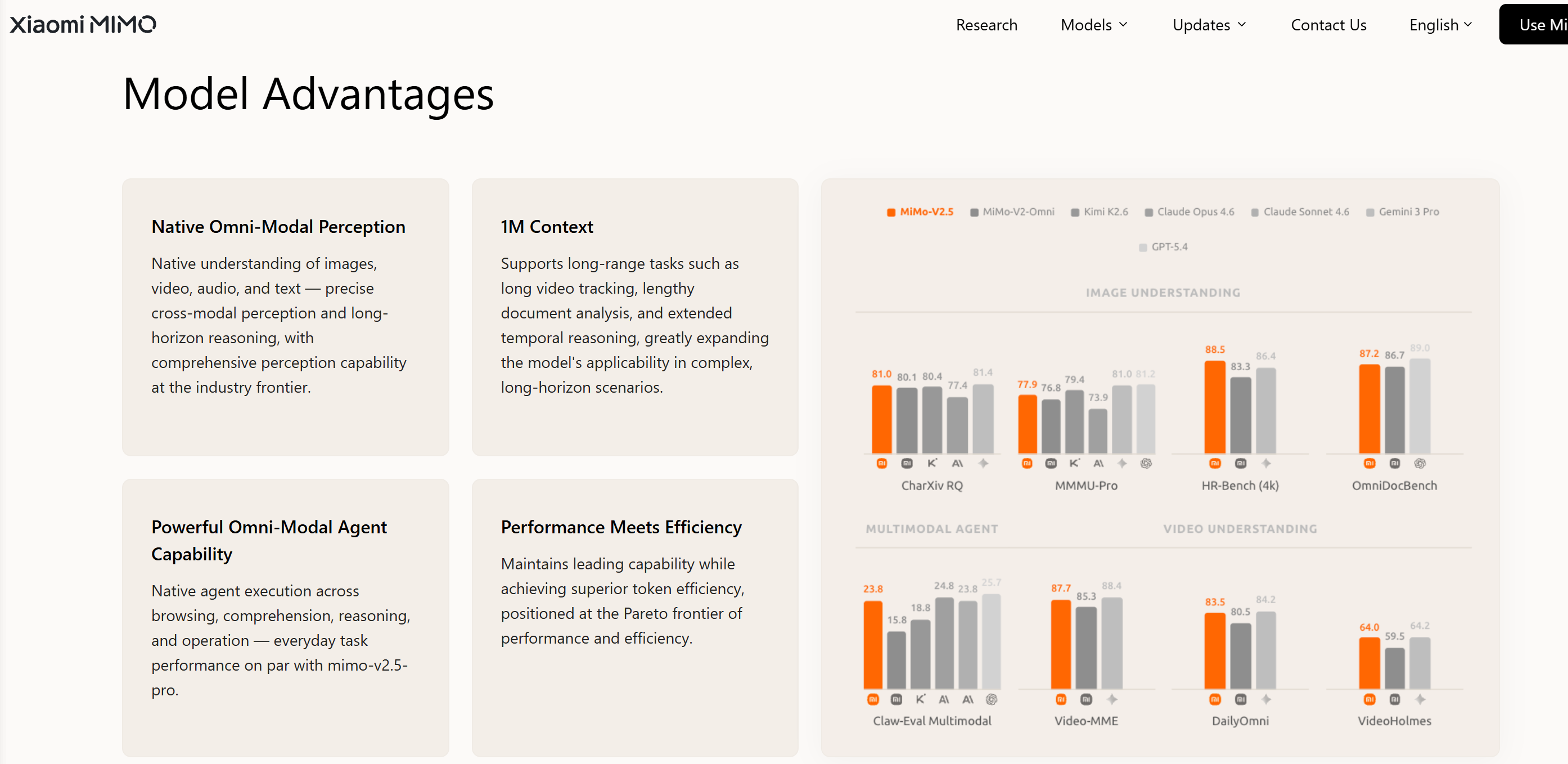
The Agent called mcp__mimo-media__understand_image and returned a detailed text description: page structure (with navigation bar and headings), the content of four advantage cards (Native Omni-modal Perception, 1M Context, Omni-modal Agent Capability, Performance-Efficiency Balance), and specific values from the eight performance benchmark bars on the right (Image Understanding, Multimodal Agent, Video Understanding dimensions, with MiMo-V2.5 vs. competitor comparison data).
The entire process required no manual screenshot annotation — the Agent completed subsequent reasoning directly from the MCP-returned text.
1.3 The Remaining Problem: Agent’s “Self-Initiative”
However, during actual long-task reasoning, a thorny issue emerged:
The Agent “takes matters into its own hands”
When the Agent encounters image/audio/video files during multi-step tasks, it tends to use the Read tool directly — rather than calling the MCP tools.
Since the main model is text-only, the binary data returned by Read cannot be understood, causing:
- Errors: the model cannot process image input
- Information loss: the Agent skips over multimedia content
- Incomplete results: critical visual/audio information is ignored
Root cause: Claude Code’s Agent defaults to using the built-in Read tool for all files — it doesn’t “know” that the current model lacks multimodal support.
2. Solution: Two-Layer Defense
Layer 1: CLAUDE.md Soft Instructions
Explicitly tell the model in the global instructions file:
- Which file types require MCP tools
- Forbid using Read on multimedia files
- Provide correct invocation examples
Limitation: Depends on the model “remembering” the instructions, which may be overlooked in complex reasoning chains.
Layer 2: PreToolUse Hook Hard Interception
Configure a Hook in settings.json that:
- Intercepts all
Readtool calls - Checks whether the target file is a multimedia format
- If yes → blocks the call (exit 2) and returns an error with the correct MCP tool name
Advantage: System-level interception, independent of model compliance.
Workflow Diagram
Agent encounters image path "screenshot.png"
    │
    ├─ Layer 1: CLAUDE.md instruction guides
    │   "Should use mcp__mimo-media__understand_image"
    │
    ├─ If Agent still attempts Read("screenshot.png")
    │
    └─ Layer 2: PreToolUse Hook intercepts
        │
        ├── Detects .png extension
        ├── exit 2 (blocks the call)
        └── stderr: "BLOCKED: Use mcp__mimo-media__understand_image"
                │
                └── Agent sees feedback → switches to MCP tool
                    │
                    └── MCP returns text description → reasoning continues
3. Complete Configuration
3.1 Prerequisites
# Check Claude Code
claude --version

# Check Python
python --version

# Check Git
git --version
3.2 Install MCP Server (Same as Original)
# 1. Clone the project
git clone https://github.com/congxxx/mimo-media-recognition-mcp.git
cd mimo-media-recognition-mcp

# 2. Install dependencies
pip install uv
uv venv .venv
uv pip install -e .
3.3 Register MCP Server
claude mcp add mimo-media \
  --scope user \
  --env MIMO_API_KEY="your-api-key" \
  --env MIMO_API_BASE="https://token-plan-cn.xiaomimimo.com/v1" \
  --env MIMO_MODEL="mimo-v2.5" \
  -- "path/to/your/python" \
  -m mimo_media_recognition_mcp.server

# Optional: for short-audio real-time transcription, add:
# --env MIMO_ASR_MODEL="mimo-v2.5-asr" \
# --env MIMO_ASR_LANGUAGE="zh"Model selection notes:
MIMO_MODELset tomimo-v2.5(general multimodal understanding, default for audio transcription)mimo-v2.5uses chain-of-thought reasoning to produce high-quality, complete transcriptions — ideal for long recordings and meeting transcripts- ASR mode is not recommended by default:
mimo-v2.5-asrtends to produce repetition loops on audio longer than ~2 minutes - Only enable
MIMO_ASR_MODELwhen you need real-time transcription of short audio clips
Verify the installation:
claude mcp get mimo-media
# Expected output: Status: ✓ Connected
3.4 Create PreToolUse Hook (New in This Solution)
3.4.1 Create the Hook Script
Create block_media_read.py in the ~/.claude/hooks/ directory:
"""
PreToolUse hook: Block Read tool on multimedia files.

When the agent tries to Read an image/audio/video file, this hook
blocks the call (exit 2) and instructs the model to use the
mimo-media MCP tools instead.
"""
import sys, json

MEDIA_MAP = {
    ".png": ("image", "understand_image"),
    ".jpg": ("image", "understand_image"),
    ".jpeg": ("image", "understand_image"),
    ".gif": ("image", "understand_image"),
    ".bmp": ("image", "understand_image"),
    ".webp": ("image", "understand_image"),
    ".svg": ("image", "understand_image"),
    ".mp3": ("audio", "understand_audio"),
    ".wav": ("audio", "understand_audio"),
    ".m4a": ("audio", "understand_audio"),
    ".ogg": ("audio", "understand_audio"),
    ".flac": ("audio", "understand_audio"),
    ".aac": ("audio", "understand_audio"),
    ".mp4": ("video", "understand_video"),
    ".mov": ("video", "understand_video"),
    ".avi": ("video", "understand_video"),
    ".mkv": ("video", "understand_video"),
    ".webm": ("video", "understand_video"),
    ".flv": ("video", "understand_video"),
}

try:
    data = json.load(sys.stdin)
except Exception:
    sys.exit(0)

tool_input = data.get("tool_input", {})
file_path = tool_input.get("file_path", "") or tool_input.get("path", "")
if not file_path:
    sys.exit(0)

ext = ""
if "." in file_path:
    ext = "." + file_path.rsplit(".", 1)[-1].lower()

if ext in MEDIA_MAP:
    media_type, mcp_tool = MEDIA_MAP[ext]
    print(
        f"BLOCKED: The Read tool cannot process {media_type} files. "
        f"Use the MCP tool `mcp__mimo-media__{mcp_tool}` instead. "
        f"Example: call mcp__mimo-media__{mcp_tool} with "
        f'{{"prompt": "describe this {media_type}", "{media_type}_path": "{file_path}"}}',
        file=sys.stderr
    )
    sys.exit(2)

sys.exit(0)
3.4.2 Register the Hook
Edit ~/.claude/settings.json and add the hooks field:
{
  "hooks": {
    "PreToolUse": [
      {
        "matcher": "Read",
        "hooks": [
          {
            "type": "command",
            "command": "python ~/.claude/hooks/block_media_read.py",
            "timeout": 5
          }
        ]
      }
    ]
  }
}How the Hook works:
matcher: "Read"— matches allReadtool invocations- The Hook script receives the tool input JSON via stdin
- Checks whether the
file_pathextension matches a multimedia format - Match →
exit 2(block the call) + stderr output with guidance - No match →
exit 0(pass through normally)
When the Hook returns exit 2, the Agent sees:
BLOCKED: The Read tool cannot process image files. Use the MCP tool
mcp__mimo-media__understand_imageinstead.
Upon receiving this feedback, the Agent automatically switches to the correct MCP tool.
3.5 Update CLAUDE.md Instructions (New in This Solution)
Add the multimedia handling rules to the end of the global ~/.claude/CLAUDE.md:
## Multimedia File Handling (Mandatory)

The current reasoning model is text-only and **cannot directly understand images, audio, or video**.

### Rule: Always Use MCP for Multimedia Files

- **Images** (.png, .jpg, .jpeg, .gif, .bmp, .webp, .svg) → use `mcp__mimo-media__understand_image`
- **Audio** (.mp3, .wav, .m4a, .ogg, .flac, .aac) → use `mcp__mimo-media__understand_audio`
- **Video** (.mp4, .mov, .avi, .mkv, .webm, .flv) → use `mcp__mimo-media__understand_video`

### Forbidden

- Do **not** use the `Read` tool on the above formats (will be blocked by Hook)
- Do **not** attempt to "interpret" binary multimedia content on your own
- Do **not** assume the content of images/audio/video

### Correct Workflow

1. Identify a multimedia file path
2. Select the corresponding MCP tool based on the extension
3. Call the MCP tool to obtain the understanding result
4. Continue reasoning based on the MCP-returned text

### Example

```bash
# Wrong ❌
Read("screenshot.png")

# Correct ✅
mcp__mimo-media__understand_image(prompt="Describe this image", image_path="screenshot.png")
```
3.6 Verify the Configuration
# Verify MCP connection
claude mcp get mimo-media

# Test the Hook script
echo '{"tool_name": "Read", "tool_input": {"file_path": "test.png"}}' | \
  python ~/.claude/hooks/block_media_read.py 2>&1
# Expected output: BLOCKED: The Read tool cannot process image files...
# Expected exit code: 2

# Test that regular files are unaffected
echo '{"tool_name": "Read", "tool_input": {"file_path": "readme.md"}}' | \
  python ~/.claude/hooks/block_media_read.py 2>&1
# Expected output: (empty)
# Expected exit code: 0
4. Comparison with the Original
| Dimension | Original (congxxx) | This Solution (+ Hook) |
|---|---|---|
| MCP Server | ✅ Configured | ✅ Configured (same as original) |
| Explicit MCP calls | ✅ Works | ✅ Works |
| CLAUDE.md instructions | — | ✅ New, guides Agent to choose MCP proactively |
| PreToolUse Hook | — | ✅ New, system-level interception of incorrect Read calls |
| Multimedia in long tasks | ⚠️ Agent may bypass MCP | ✅ Two-layer defense, ensures MCP path |
| Configuration complexity | Low | Medium (one extra Hook script + CLAUDE.md config) |
5. Lessons Learned
5.1 Path Issues in the Hook Script
Symptom: The Hook script encounters inconsistent path separators on Windows.
Cause: Claude Code executes Hooks via Git Bash on Windows, where paths may appear in /c/Users/... format.
Solution: The Hook script only checks file extensions and does not depend on path format, so it remains unaffected.
5.2 Hook Not Taking Effect
Symptom: The Hook is configured but the Agent still directly Reads images.
Troubleshooting steps:
- Verify the
hooksfield format insettings.jsonis correct - Confirm the Hook script path is accessible to Python
- Restart the Claude Code session (Hook configuration requires reloading)
5.3 Audio Transcription Returning Placeholder / Unrelated Content (2026-07-06 Update)
Symptom: Calling understand_audio to transcribe Chinese audio consistently returned irrelevant English responses (e.g., a fake “coffee shop ordering” dialogue, “I cannot process audio files”), completely unrelated to the actual recording.
Investigation:
- Confirmed file exists and format is valid (2.1MB MP3, ~9 minutes phone recording)
- Verified API connectivity via the
mimo://configMCP resource — normal - Read the MCP Server source code (
server.py) directly, discovering two critical bugs:
Root Cause A: [:80] Truncation Bug
# server.py line 165 (before fix)
content_blocks.append({
    "type": "text",
    "text": f"[Audio file: {media_url[:80]}...]",  # ← Only first 80 chars!
})
A 2.1MB MP3 file produces ~3MB of base64-encoded data, but [:80] sends only the first 80 characters of the data URL: data:audio/mpeg;base64,//uQxAAA... — the model received a text marker with no actual audio data to process.
Root Cause B: Wrong API Format
After consulting the MIMO official documentation, we discovered that MIMO’s Anthropic API (/anthropic/v1/messages) only supports text and image content blocks — it does not natively support audio or video input.
The correct approach is to use the OpenAI-compatible endpoint (/v1/chat/completions) with input_audio content blocks:
// ❌ MCP Server old format (text wrapper, Anthropic endpoint)
{"type": "text", "text": "[Audio file: data:audio/mpeg;base64,<truncated>]"}
// API response: model cannot understand audio

// ✅ MIMO official format (input_audio, OpenAI endpoint)
{"type": "input_audio", "input_audio": {"data": "data:audio/mpeg;base64,<full base64>"}}
// API response: correct transcription text
The Fix:
An architecture-level rewrite of server.py:
| Component | Before Fix | After Fix |
|---|---|---|
| Images | Anthropic endpoint (working) | Unchanged |
| Audio/Video | Anthropic endpoint + type: "text" + [:80] truncation |
OpenAI endpoint + type: "input_audio"/"input_video" + full base64 |
| ASR support | None | Via MIMO_ASR_MODEL and MIMO_ASR_LANGUAGE environment variables |
| Timeout | 120s | 300s (large audio files need more time) |
A Note on ASR Model Suitability
After empirical comparison, mimo-v2.5-asr and mimo-v2.5 show significant differences in transcription tasks:
| Dimension | mimo-v2.5-asr |
mimo-v2.5 |
|---|---|---|
| Long audio (>2 min) | ❌ Severe repetition loops | ✅ Complete and accurate |
| Short audio (<2 min) | ✅ Fast real-time | ✅ Comparable quality |
| Transcription method | End-to-end sequence decoding | Chain-of-thought reasoning |
| Output control | Weak (no prompt constraint) | Strong (prompt-controllable) |
Recommendation: Keep MIMO_ASR_MODEL disabled by default. Let understand_audio use mimo-v2.5’s chain-of-thought transcription. Only enable ASR mode when real-time transcription of short clips is needed.
6. Configuration Reference
File Checklist
| File | Purpose |
|---|---|
~/.claude/settings.json |
Hook registration + global settings |
~/.claude/CLAUDE.md |
Global instructions (including multimedia rules) |
~/.claude/hooks/block_media_read.py |
Hook script |
| MCP Server project directory | mimo-media-recognition-mcp |
7. Summary
Core idea: Decouple multimedia recognition from the model itself and transform it into a tool-calling capability via the MCP protocol.
Key innovation: Building on the original MCP solution, add a PreToolUse Hook as a system-level safety net to ensure the Agent never bypasses MCP when handling multimedia files, under any circumstances.
Two-layer defense:
- Soft instruction (CLAUDE.md) — guides the Agent to proactively choose the correct tool
- Hard interception (PreToolUse Hook) — acts as a fallback, blocking incorrect tool calls
This “soft guidance + hard interception” pattern is not limited to multimedia scenarios — it can be generalized to any situation requiring enforced tool routing.
References
- 🔗 GitHub (Original MCP Server): https://github.com/congxxx/mimo-media-recognition-mcp
- 🔗 GitHub (This Solution’s Hook): https://github.com/SongXue-J/claude-code-multimedia-hook
- 📝 Original blog post: Solving multimedia recognition issues after connecting Claude Code to MIMO models
- 📖 MCP Documentation: https://modelcontextprotocol.io
- 📖 Claude Code Hooks Documentation: https://docs.anthropic.com/en/docs/claude-code/hooks